Split payments smarter with the world’s best expense-sharing spreadsheet.
(And it’s totally free.)
SquareUsUp is an intuitive and comprehensive premade Excel spreadsheet that makes the splitting and tracking of shared group expenses remarkably simple.
By using an expense-sharing app like SquareUsUp, a group can record payments of shared expenses (a restaurant check, golf fees, movie tickets, a utility bill) to let the app determine what everyone owes or is owed. This allows group members to square up their accumulated debts at a more convenient time.
SquareUsUp allows for unequal splitting of expenses, different participants in each transaction, multiple payers, refunds, payments between group members, the use of a pot, foreign currency transactions, and combinations of all of the above. And all of this while requiring no Excel knowledge whatsoever.
Yes, “world’s best” is a bold claim, but we can back it up. SquareUsUp is the only spreadsheet that elegantly implements every essential feature a serious group expense-sharing app must have.

Perfect for roommates, vacations, sports groups, clubs, group events, and any situation where expenses may be shared.
Why choose SquareUsUp?
The market-leading expense-sharing apps and SquareUsUp are all user-friendly and can easily handle just about any expense-sharing scenario you’ll encounter. So how do you decide which to use?
You’ll likely want to choose a market-leading expense-sharing app if:
Group members want to enter expenses themselves on their phones
Group members want to communicate with each other and pay each other through the app
Group members want to be able to view financial statuses in real time
You want to do receipt scanning
You want to be able to handle multiple currencies natively
You don’t mind having to export and build an auditable ledger of users and transactions
You’ll likely want to choose SquareUsUp if:
Group members want one person to track the group’s expenses
You want to keep all the group’s financial information in a single portable file you own and can keep forever
You want to natively view a ledger of users and transactions to promote auditability, transparency, and fairness
You want a system that will work when there is no online connectivity
You don’t want to set up accounts for group members
You don’t want your financial data living in a cloud service
You don’t want to pay for a service or view ads
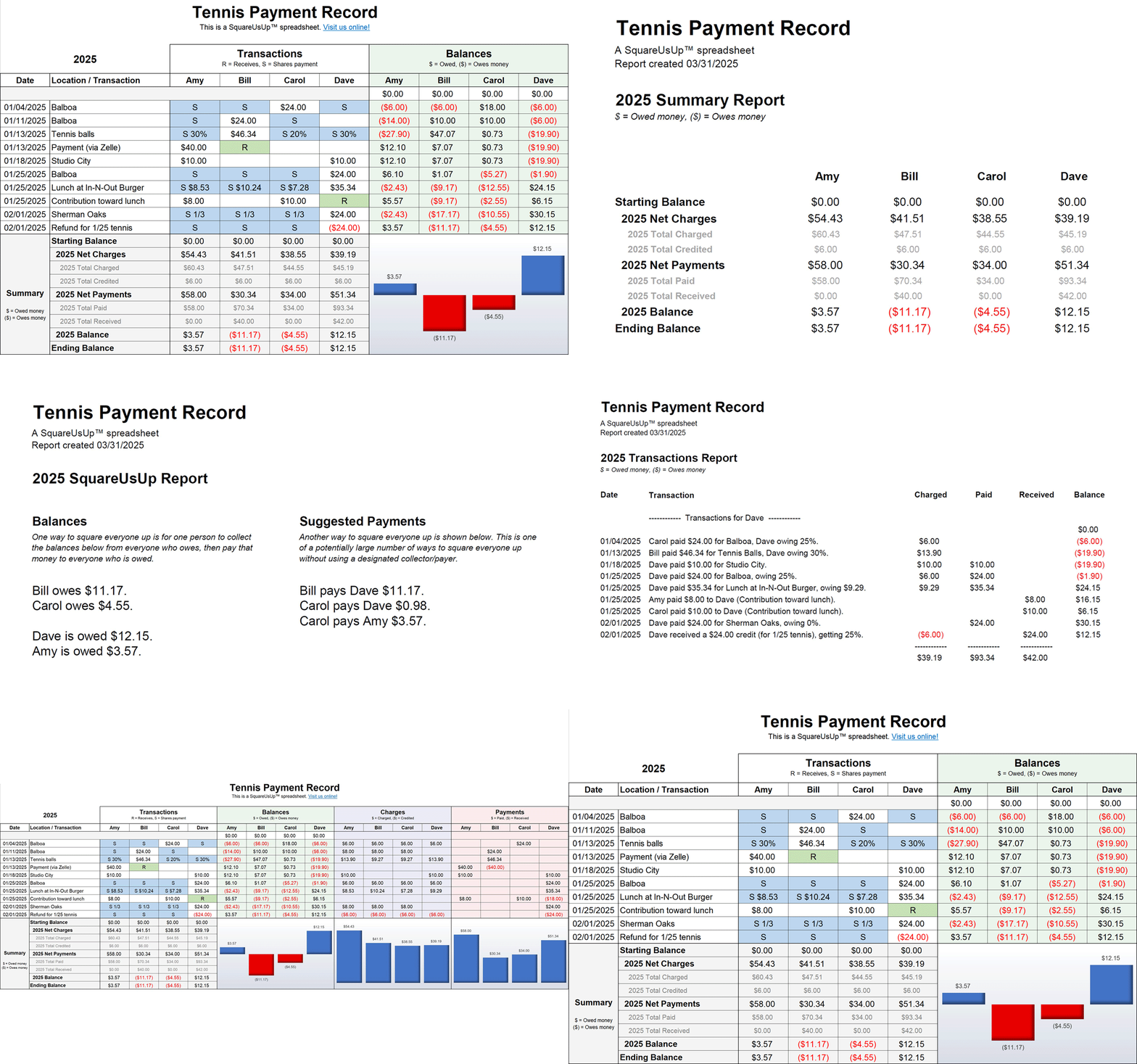
A SquareUsUp spreadsheet is entirely self-contained, with no dropdown menus or separate tables to maintain. A transaction entry form eases data entry, and buttons do all the heavy lifting, so you need no Excel expertise. Transactions and debt-reconciliation reports may be viewed, printed, or saved with the click of a button.
Effortless, powerful group expense sharing.
(If you’ve got 4 minutes, we’ll show you.)
Let’s get started.
If you have genuine Microsoft Excel installed on your computer, you have everything you need.
To get the SquareUsUp template file that’s used to create new projects, go to the Download page. The instructions there spell out the simple steps to obtain a fully functional template file.
If you’ve watched the Demo video above, you’re well on your way to using SquareUsUp productively. For a more in-depth discussion of SquareUsUp’s capabilities and its use in various expense-sharing scenarios, the Learn page has both a video tutorial and a 26-page user guide.
If you’ve still got any problems or questions, if you want to make a comment or suggestion, or if you’d like to leave a brief review of SquareUsUp, we’d love to hear from you. Just use the Contact page.